<!DOCTYPE html>
    <html lang="vi" xmlns="http://www.w3.org/1999/xhtml" prefix="og: http://ogp.me/ns#">
    <head>
<title>Tạo Password Cho PLC S7 300</title>
<meta name="description" content="Tạo Password Cho PLC S7 300 - Savefile - Tin Tức - https&#x3A;&#x002F;&#x002F;giahungtech.com&#x002F;news&#x002F;savefile&#x002F;huong-dan&#x002F;tao-password-cho-plc-s7-300-16.html">
<meta name="author" content="CÔNG TY TNHH TỰ ĐỘNG HÓA GIA HƯNG TECH">
<meta name="copyright" content="CÔNG TY TNHH TỰ ĐỘNG HÓA GIA HƯNG TECH [mr.anhlv@gmail.com]">
<meta name="google-site-verification" content="gDGgLc4qBYy9_5H9NUfAy0BSdCWhxCiMIackhCSr2vg">
<meta name="msvalidate.01" content="171F162059CAB2E1BD9C86B5970FBF31">
<meta name="robots" content="index, archive, follow, noodp">
<meta name="googlebot" content="index, archive, follow, noodp">
<meta name="msnbot" content="index, archive, follow, noodp">
<meta name="coccocbot-web" content="index, archive, follow, noodp">
<meta name="generator" content="TMS v4.5">
<meta name="viewport" content="width=device-width, initial-scale=1">
<meta http-equiv="Content-Type" content="text/html; charset=utf-8">
<meta property="og:title" content="Tạo Password Cho PLC S7 300">
<meta property="og:type" content="website">
<meta property="og:description" content="Savefile - Tin Tức - https&#x3A;&#x002F;&#x002F;giahungtech.com&#x002F;news&#x002F;savefile&#x002F;huong-dan&#x002F;tao-password-cho-plc-s7-300-16.html">
<meta property="og:site_name" content="CÔNG TY TNHH TỰ ĐỘNG HÓA GIA HƯNG TECH">
<meta property="og:image" content="https://giahungtech.com/uploads/plcnext_starterkit3.jpg">
<meta property="og:image:url" content="https://giahungtech.com/uploads/plcnext_starterkit3.jpg">
<meta property="og:image:type" content="image/jpeg">
<meta property="og:image:width" content="1280">
<meta property="og:image:height" content="720">
<meta property="og:url" content="https://giahungtech.com/news/savefile/huong-dan/tao-password-cho-plc-s7-300-16.html">
<link rel="shortcut icon" href="https://giahungtech.com/uploads/icon.ico">
<link rel="canonical" href="https://giahungtech.com/news/savefile/huong-dan/tao-password-cho-plc-s7-300-16.html">
<link rel="alternate" href="https://giahungtech.com/news/rss/" title="Tin Tức" type="application/rss+xml">
<link rel="alternate" href="https://giahungtech.com/news/rss/dao-tao-ngan-han/" title="Tin Tức - Đào tạo ngắn hạn" type="application/rss+xml">
<link rel="alternate" href="https://giahungtech.com/news/rss/file-mau/" title="Tin Tức - File mẫu" type="application/rss+xml">
<link rel="alternate" href="https://giahungtech.com/news/rss/huong-dan/" title="Tin Tức - Hướng dẫn" type="application/rss+xml">
<link rel="alternate" href="https://giahungtech.com/news/rss/tin-tuc/" title="Tin Tức - Tin tức" type="application/rss+xml">
<link rel="preload" as="style" href="https://giahungtech.com/assets/css/font-awesome.min.css" type="text/css">
<link rel="preload" as="style" href="https://giahungtech.com/themes/default/css/bootstrap.min.css" type="text/css">
<link rel="preload" as="style" href="https://giahungtech.com/themes/default/css/style.css" type="text/css">
<link rel="preload" as="style" href="https://giahungtech.com/themes/default/css/style.responsive.css" type="text/css">
<link rel="preload" as="style" href="https://giahungtech.com/themes/default/css/news.css" type="text/css">
<link rel="preload" as="style" href="https://giahungtech.com/themes/default/css/custom.css" type="text/css">
<link rel="preload" as="style" href="https://giahungtech.com/themes/default/tms/css/swiper.css" type="text/css">
<link rel="preload" as="style" href="https://giahungtech.com/themes/default/css/tms_menu.css" type="text/css">
<link rel="preload" as="script" href="https://giahungtech.com/assets/js/jquery/jquery.min.js" type="text/javascript">
<link rel="preload" as="script" href="https://giahungtech.com/assets/js/language/vi.js" type="text/javascript">
<link rel="preload" as="script" href="https://giahungtech.com/assets/js/global.js" type="text/javascript">
<link rel="preload" as="script" href="https://giahungtech.com/themes/default/js/news.js" type="text/javascript">
<link rel="preload" as="script" href="https://giahungtech.com/themes/default/js/main.js" type="text/javascript">
<link rel="preload" as="script" href="https://giahungtech.com/themes/default/js/custom.js" type="text/javascript">
<link rel="preload" as="script" href="https://giahungtech.com/themes/default/tms/js/swiper.js" type="text/javascript">
<link rel="preload" as="script" href="https://giahungtech.com/themes/default/js/tms_menu.js" type="text/javascript">
<link rel="preload" as="script" href="https://www.googletagmanager.com/gtag/js?id=G-NTD0WQBV7B" type="text/javascript">
<link rel="preload" as="script" href="https://pagead2.googlesyndication.com/pagead/js/adsbygoogle.js?client=ca-pub-1900612952327782" type="text/javascript" crossorigin="anonymous">
<link rel="preload" as="script" href="https://giahungtech.com/themes/default/js/bootstrap.min.js" type="text/javascript">
<link rel="stylesheet" href="https://giahungtech.com/assets/css/font-awesome.min.css">
<link rel="stylesheet" href="https://giahungtech.com/themes/default/css/bootstrap.min.css">
<link rel="stylesheet" href="https://giahungtech.com/themes/default/css/style.css">
<link rel="stylesheet" href="https://giahungtech.com/themes/default/css/style.responsive.css">
<link rel="StyleSheet" href="https://giahungtech.com/themes/default/css/news.css">
<link rel="stylesheet" href="https://giahungtech.com/themes/default/css/custom.css">
<link rel="stylesheet" type="text/css" href="https://giahungtech.com/themes/default/tms/css/swiper.css">
<link id="theme" rel="stylesheet" type="text/css" media="all" href="https://giahungtech.com/themes/default/css/tms_menu.css" />
<style>
	body{background: #fff;}
</style>
<script data-show="inline">(function(i,s,o,g,r,a,m){i['GoogleAnalyticsObject']=r;i[r]=i[r]||function(){
(i[r].q=i[r].q||[]).push(arguments)},i[r].l=1*new Date();a=s.createElement(o),
m=s.getElementsByTagName(o)[0];a.async=1;a.src=g;m.parentNode.insertBefore(a,m)
})(window,document,'script','https://www.google-analytics.com/analytics.js','ga');
ga('create', 'UA-70168873-1', '.giahungtech.com');
ga('send', 'pageview');
</script>
</head>
    <body>
<amp-auto-ads type="adsense"
        data-ad-client="ca-pub-1900612952327782">
</amp-auto-ads>
<script src="https://giahungtech.com/assets/js/jquery/jquery.min.js"></script>
<script>var nv_base_siteurl="/",nv_lang_data="vi",nv_lang_interface="vi",nv_name_variable="nv",nv_fc_variable="op",nv_lang_variable="language",nv_module_name="news",nv_func_name="savefile",nv_is_user=0, nv_my_ofs=-4,nv_my_abbr="EDT",nv_cookie_prefix="nv4",nv_check_pass_mstime=59878000,nv_area_admin=0,nv_safemode=0,theme_responsive=1,nv_recaptcha_ver=2,nv_recaptcha_sitekey="",nv_recaptcha_type="image";</script>
<script src="https://giahungtech.com/assets/js/language/vi.js"></script>
<script src="https://giahungtech.com/assets/js/global.js"></script>
<script src="https://giahungtech.com/themes/default/js/news.js"></script>
<script src="https://giahungtech.com/themes/default/js/main.js"></script>
<script src="https://giahungtech.com/themes/default/js/custom.js"></script>
<script type="text/javascript" src="https://giahungtech.com/themes/default/tms/js/swiper.js"></script>
<script type="text/javascript" src="https://giahungtech.com/themes/default/js/tms_menu.js"></script>
<script type="application/ld+json">
        {
            "@context": "https://schema.org",
            "@type": "Organization",
            "url": "https://giahungtech.com",
            "logo": "https://giahungtech.com/assets/images/logo.png"
        }
        </script>
<script async src="https://www.googletagmanager.com/gtag/js?id=G-NTD0WQBV7B"></script>
<script>window.dataLayer=window.dataLayer||[];function gtag(){dataLayer.push(arguments)}gtag('js',new Date);gtag('config','G-NTD0WQBV7B');</script>
<script async src="https://pagead2.googlesyndication.com/pagead/js/adsbygoogle.js?client=ca-pub-1900612952327782"
     crossorigin="anonymous"></script>
<script src="https://giahungtech.com/themes/default/js/bootstrap.min.js"></script>
</body>
<div id="print">
	<div id="hd_print">
		<h2 class="pull-left">CÔNG TY TNHH TỰ ĐỘNG HÓA GIA HƯNG TECH</h2>
		<p class="pull-right"><a title="CÔNG TY TNHH TỰ ĐỘNG HÓA GIA HƯNG TECH" href="https://giahungtech.com/">https://giahungtech.com</a></p>
	</div>
	<div class="clear"></div>
	<hr />
	<div id="content">
		<h1>Tạo Password Cho PLC S7 300</h1>
		<ul class="list-inline">
			<li>Thứ sáu - 17/09/2021 13:10</li>
			<li class="hidden-print txtrequired"><em class="fa fa-print">&nbsp;</em><a title="In ra" href="javascript:;" onclick="window.print()">In ra</a></li>
			<li class="hidden-print txtrequired"><em class="fa fa-power-off">&nbsp;</em><a title="Đóng cửa sổ này" href="javascript:;" onclick="window.close()">Đóng cửa sổ này</a></li>
		</ul>
		<div class="clear"></div>
		<div id="hometext">
			Mình xin giới thiệu cho các bạn cách đặt password cho PLC S7 300, ở đây mình thực hiện là dòng PLC Siemens nhe!
		</div>
				<div class="imghome">
			<img alt="Tạo Password Cho PLC S7 300" src="https://giahungtech.com/uploads/news/2017_02/1320805d-5cpu313c-2dp.jpg" width="460" class="img-thumbnail" />
		</div>
		<div class="clear"></div>
		<div id="bodytext" class="clearfix">
			Để tạo mật khẩu cho PLC S7 300 các bạn làm như sau<br />
Bước 1:<br />
Chúng ta nhấp chuột vào tên plc cần đặt pass rồi nhấp đúp vào Hardware<br />
<img alt="b11" height="460" src="https://giahungtech.com/uploads/news/2017_02/b11.png" width="819" /><br />
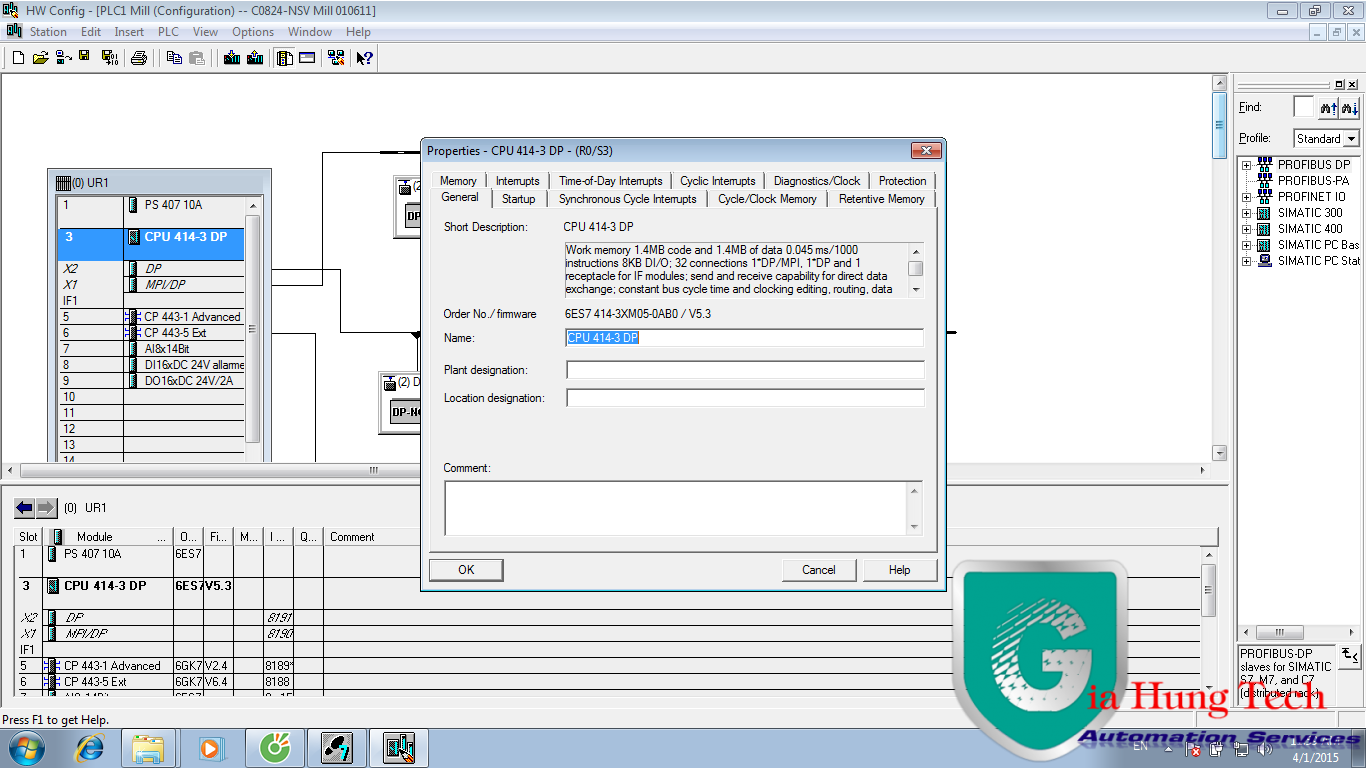
Bước 2: khi đó một cửa sổ mở ra. Chúng ta nhấp đúp chuột vào CPU,một cửa sổ nữa mở ra<br />
<img alt="b2" height="768" src="https://giahungtech.com/uploads/news/2017_02/b2.png" width="1366" /><br />
<img alt="b3" height="768" src="https://giahungtech.com/uploads/news/2017_02/b3.png" width="1366" /><br />
<img alt="b4" height="768" src="https://giahungtech.com/uploads/news/2017_02/b4.png" width="1366" /><br />
Bước 3: Trong cửa sổ mở ra ta chọn thẻ Protection, Lúc này chúng ta có 3 lựa chọn<br />
&nbsp; &nbsp; &nbsp; &nbsp; &nbsp; &nbsp; &nbsp; 1. Không đặt pass<br />
&nbsp; &nbsp; &nbsp; &nbsp; &nbsp; &nbsp; &nbsp; 2. Đặt pass và chỉ cho xem chương trình, không cho Download và Upload<br />
&nbsp; &nbsp; &nbsp; &nbsp; &nbsp; &nbsp; &nbsp; 3. Đặt pass không cho là gì hết.<br />
Bước 4: Chúng ta đặt pass rồi nhập lại pass một lần nữa =&gt; OK =&gt; Download hardware về CPU là xong.<br />
<br />
<br />
<br />
<br />
<br />
&nbsp;
		</div>
				<div id="author">
						<p>
				<strong>Tác giả:</strong>
				<a href="https://giahungtech.com/news/author/admin/">admin</a>
			</p>
		</div>
	</div>
	<div id="footer" class="clearfix">
		<div id="url">
			<strong>URL của bản tin này: </strong><a href="https://giahungtech.com/news/savefile/huong-dan/tao-password-cho-plc-s7-300-16.html" title="Tạo Password Cho PLC S7 300">https://giahungtech.com/news/savefile/huong-dan/tao-password-cho-plc-s7-300-16.html</a>

		</div>
		<div class="clear"></div>
		<div class="copyright">
			&copy; CÔNG TY TNHH TỰ ĐỘNG HÓA GIA HƯNG TECH
		</div>
		<div id="contact">
			<a href="mailto:mr.anhlv@gmail.com">mr.anhlv@gmail.com</a>
		</div>
	</div>
</div>

     <head>
      </head>     
        <div id="timeoutsess" class="chromeframe">
            Bạn đã không sử dụng Site, <a onclick="timeoutsesscancel();" href="https://giahungtech.com/#">Bấm vào đây để duy trì trạng thái đăng nhập</a>. Thời gian chờ: <span id="secField"> 60 </span> giây
        </div>
        <div id="openidResult" class="nv-alert" style="display:none"></div>
        <div id="openidBt" data-result="" data-redirect=""></div>
    </body>
</html>